
Math Evaluator
Type a maths expression the way you would write it — 3 + 4 × (2 − 1)², sqrt(144) / 3, sin(30) or 5! — and see the answer as you type. The evaluator follows the standard order of operations, supports functions, constants and variables across lines, and shows each line’s result so you can build up a calculation step by step.
- Free to use
- No sign-up
- Runs in your browser
Expression evaluator
Math Formula Reference Sheets
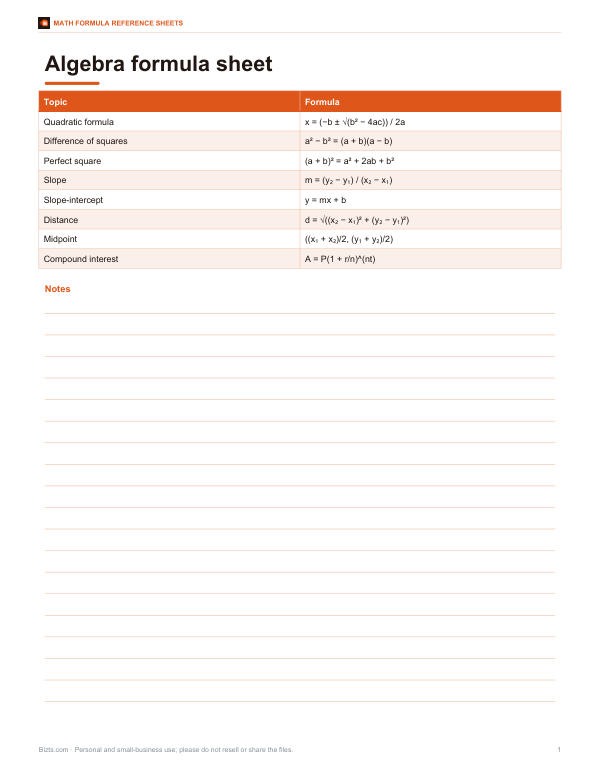
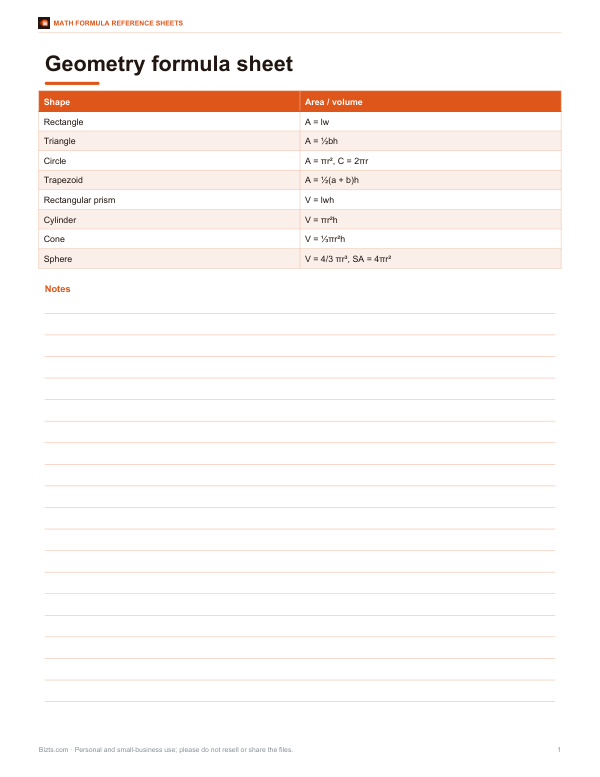
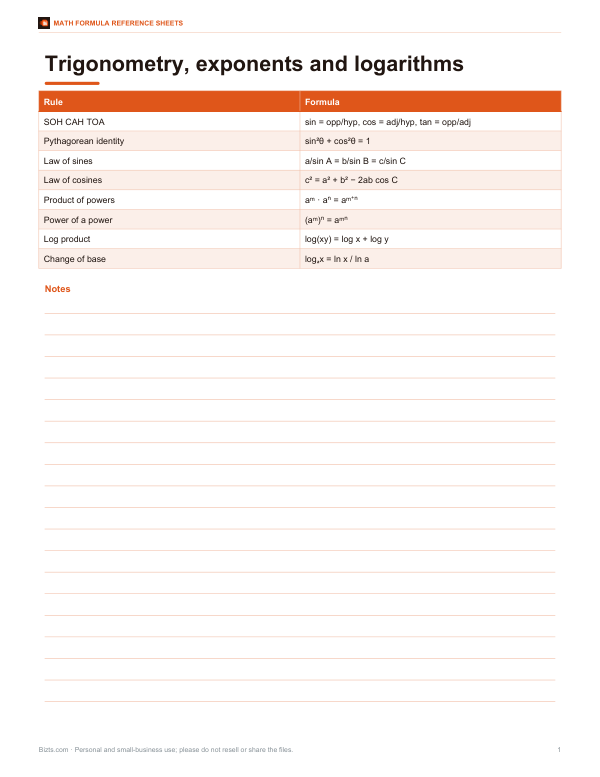
Printable algebra, geometry, trigonometry and exponent/log formula sheets, an order of operations poster and a scientific calculator skills worksheet.
- Algebra formulas (PDF)
- Geometry formulas (PDF)
- Trig, exponents & logs (PDF)
- Order of operations poster (PDF, DOCX)
Formats: PDF, DOCX. Instant download after payment (link valid 72 hours, up to 5 downloads). AI-assisted: the templates were drafted with AI help and reviewed and laid out before publishing.
$3.00 USD, one-time 4 files · about $0.75 each
- Instant download
- 7-day refund
- Secure checkout by Stripe
7-day money-back guarantee. Full refund within 7 days of purchase, even after you download.
Free sample: Algebra Formulas (PDF, 116 KB)
Full refund within 7 days — see the refund policy and license.
Free printables
Single sheets you can print right now, no sign-up. The full pack adds every sheet in one download plus the editable files.
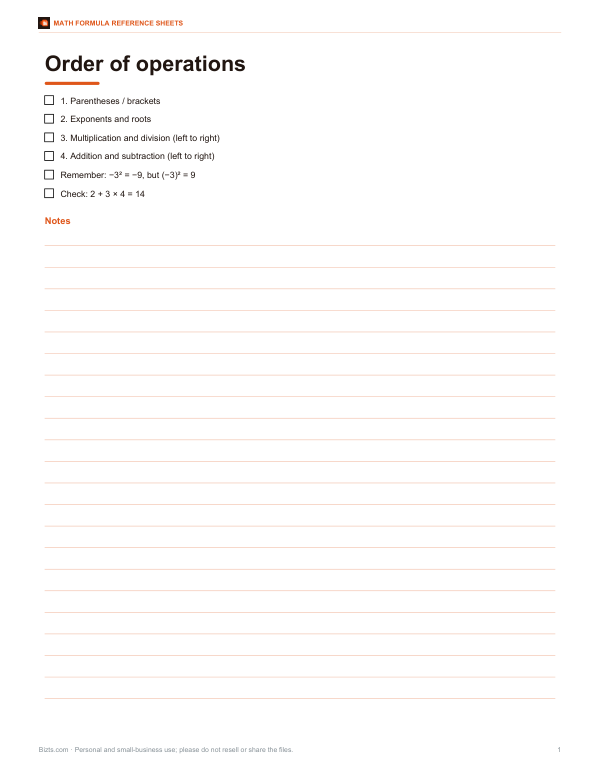 Printable Order of Operations Poster
How to use the math evaluator
- Type an expression on a line, such as
3 + 4 * 2. The result appears next to it as you type. - Use parentheses to group,
^for powers,!for factorial and%for percent. - Call functions like
sqrt(2),sin(45)orlog(100). - Define variables with
name = expression, then use them on later lines. - Use
ansfor the previous line’s result. - Switch between degrees and radians for trigonometry, and choose how many decimal places to show.
Implicit multiplication works for common cases: 2pi, 3(4 + 1) and 2 r are read as multiplication.
Order of operations
The evaluator applies the standard order: parentheses first, then factorials and percentages, then powers (evaluated right to left, so 2^3^2 = 2^9 = 512), then unary minus, then multiplication and division from left to right, then addition and subtraction from left to right. Note that -3^2 is −9, because the power applies before the minus sign — the same convention used in mathematics and most programming languages. Write (-3)^2 for 9.
Supported functions and constants
| Category | Available |
|---|---|
| Arithmetic | + − × ÷ (also * and /), ^ or **, %, ! |
| Roots and powers | sqrt(x), cbrt(x), exp(x) |
| Logarithms | log(x) base 10, ln(x) natural, log2(x) |
| Trigonometry | sin, cos, tan, asin, acos, atan (degrees or radians) |
| Rounding | round, floor, ceil, abs, sign |
| Multiple arguments | min(a, b, …), max(a, b, …) |
| Constants | pi (π), e |
| Memory | ans = previous result; any variable you define |
Worked examples
| Expression | Result | Why |
|---|---|---|
| 3 + 4 * (2 - 1)^2 | 7 | Parentheses, then power, then multiply, then add |
| sqrt(144) / 3 | 4 | 12 ÷ 3 |
| area = pi * r^2 (r = 2.5) | 19.634954 | Circle area with a variable |
| sin(30) + cos(60) | 1 | In degrees, both are 0.5 |
| 5! / (2! * 3!) | 10 | Combinations of 5 items taken 2 at a time |
| 15% * 80 | 12 | 15% is 0.15 |
| log(1000) + ln(e^2) | 5 | 3 + 2 |
Floating-point precision
Computers store most decimal numbers in binary floating point, so some results carry tiny rounding errors — the classic example is 0.1 + 0.2, which is 0.30000000000000004 internally. The evaluator rounds displayed results to the number of decimal places you choose, which hides these artefacts for normal use. For exact financial calculations with many steps, round to cents at each step or use a spreadsheet with decimal formatting.
Uses
- Checking homework and worked solutions line by line.
- Quick engineering or physics calculations with named variables.
- Unit conversions: for example
72 * 2.54for inches to centimetres. - Finance:
1000 * (1 + 0.05/12)^(12*10)for compound interest. - Recipe or construction scaling with a variable for the scale factor.
Common mistakes
| Typed | Problem | Fix |
|---|---|---|
| 2(3 | Missing closing parenthesis | 2(3) |
| sin 30 | Function needs parentheses | sin(30) |
| 3,000 | Commas separate function arguments | 3000 |
| x² | Superscript not recognised | x^2 |
| tan(90) | Undefined in degrees | Result is extremely large; check the angle |
Why not just use a calculator?
A text-based evaluator shows the whole expression, so you can see and fix a typo instead of re-entering everything. It keeps a list of calculations with their results, supports variables for multi-step problems, and follows the order of operations exactly — unlike some basic calculators, which evaluate left to right as you press keys.
Using variables for multi-step problems
Variables turn the evaluator into a small worksheet. For a loan, write P = 20000, r = 0.06/12 and n = 60 on separate lines, then payment = P*r/(1-(1+r)^-n) to get the monthly payment of about 386.66. Change P on the first line and every result below updates. For physics, define g = 9.81 and t = 2.5, then d = 0.5*g*t^2 for the distance fallen. Naming quantities makes calculations easier to check and reuse.
Percentages
The % sign divides the number before it by 100, so 15% is 0.15 and 15% * 80 is 12. To add a percentage, write 80 * (1 + 15%) = 92; to remove one, 92 / (1 + 15%) = 80. This avoids the ambiguity of calculator percentage keys, which behave differently between models.
Factorials and combinations
The factorial n! multiplies all whole numbers from 1 to n: 5! = 120. Factorials grow very quickly — 20! is over two quintillion and 171! is beyond the range of standard numbers, so the evaluator returns Infinity. Combinations (how many ways to choose k items from n) are n! / (k! (n − k)!), so choosing 2 from 5 gives 10, as in the example above.
Privacy
Expressions are evaluated in your browser by a small parser written for this page — no data is sent to a server, and the page does not use JavaScript’s eval, so only mathematical expressions can run.
Frequently asked questions
Does it follow the order of operations?
Yes: parentheses, powers, multiplication and division left to right, then addition and subtraction.
How do I write powers?
Use ^ or **, for example 2^10.
Does it use degrees or radians?
Your choice; switch with the Angles option.
Can I use variables?
Yes. Write r = 2.5 on one line and use r on later lines.
What does ans mean?
The result of the previous line.
Is my work saved?
No, it stays in your browser while the page is open.
Why is -3^2 negative?
Powers are applied before the minus sign, so -3^2 = -(3^2) = -9. Write (-3)^2 for 9.
Does it support complex numbers?
No. Square roots of negative numbers return NaN (not a number).
Can I use commas in numbers?
No. Commas separate function arguments, so type 3000, not 3,000.